I Paused My Game to Be Here SVG Cut File: A Practical Guide for Clean Cuts and Better Projects
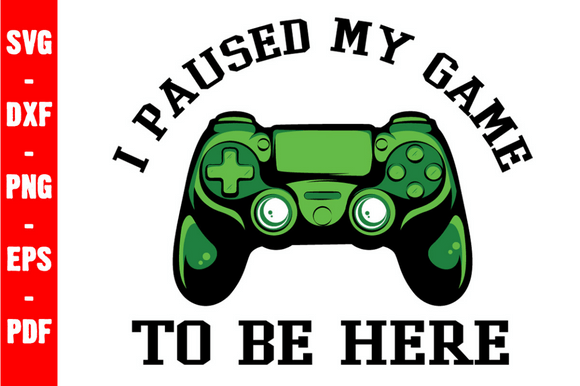
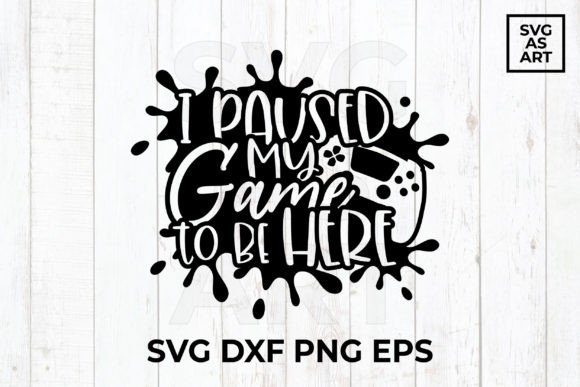
The phrase "I Paused My Game to Be Here" has become a staple in the crafting community, bridging the gap between gaming culture and personalized apparel. Whether you are creating matching shirts for a family reunion, designing merchandise for an esports team, or simply making a gift for the gamer in your life, the I Paused My Game to Be Here SVG Cut File offers a versatile foundation for these projects. However, having the design is only the first step. The difference between a professional-looking finished product and a frustrating waste of vinyl often lies in understanding the technical nuances of digital cut files.
Many crafters, from hobbyists to small business owners, assume that all SVG files behave identically across different platforms. This assumption frequently leads to jagged edges, missing elements, or hours of unnecessary node editing. By understanding the specific file formats included with this design—EPS, SVG, PNG 300 PPI, and DXF—you can avoid common pitfalls and ensure your cutting machine performs exactly as intended.
Selecting the Correct Format for Your Software
One of the most frequent mistakes occurs before the blade even touches the material. Users often download the zip folder and immediately click on the first file they recognize without verifying compatibility. While the I Paused My Game to Be Here SVG Cut File includes multiple formats, they serve distinct purposes.
- SVG (Scalable Vector Graphics): This is typically the best choice for Cricut Design Space and Silhouette Studio Designer Edition. It retains vector paths, allowing for infinite resizing without quality loss. If you are using a standard version of Silhouette Studio, however, the SVG may not import correctly.
- DXF (Drawing Exchange Format): This format is specifically designed for users of the free, basic version of Silhouette Studio. Unlike SVGs, DXFs are universally compatible with entry-level software but may sometimes require ungrouping after import.
- PNG 300 PPI: This is a raster image, not a vector. It is ideal for sublimation, direct-to-garment printing, or use as a printable sticker layer. It cannot be cut by path unless you use a trace feature, which is less precise than using the native vector files.
- EPS (Encapsulated PostScript): Best reserved for professional design software like Adobe Illustrator, CorelDRAW, or Inkscape. Using EPS in consumer cutting software can sometimes result in scaling errors or unrecognized layers.
Taking thirty seconds to match the file extension to your specific software version prevents the frustration of distorted designs or uncuttable images. Always check your machine’s documentation if you are unsure which format it prioritizes.
Avoiding Node and Layering Issues
Gaming typography often features intricate details, pixel art elements, or distressed textures that look fantastic on screen but can be problematic on vinyl. A common oversight with the I Paused My Game to Be Here SVG Cut File is failing to inspect the node count and layer structure before cutting.
If the design includes a distressed or grunge effect, the cutting machine must make thousands of tiny micro-cuts. On lightweight vinyl or paper, this can cause tearing or mat damage. Before sending the job to your cutter, zoom in to 200% or higher in your software. Look for overlapping lines or stray anchor points. If the distress texture looks too dense, consider using the "simplify" function in your design software or opting for a cleaner version of the graphic if available. For heat transfer vinyl (HTV), excessive nodes can also lead to weeding nightmares where small pieces lift unintentionally during the peeling process.
Additionally, verify that the design is properly grouped or welded. Text-based designs should usually be welded into a single layer for HTV applications to prevent individual letters from shifting during pressing. If the file arrives with separate layers for each color or letter, take the time to organize them in your canvas before cutting to maintain proper alignment.
Understanding Licensing and Commercial Use
For entrepreneurs and sellers, the technical aspect of the file is only half the equation. A significant area of confusion involves the distinction between owning a digital file and owning the rights to sell products made with it. Just because you have purchased the I Paused My Game to Be Here SVG Cut File does not automatically grant unlimited commercial licensing.
Misunderstanding usage rights can lead to platform takedowns on sites like Etsy or Amazon. Always review the specific license agreement included with your download. Some licenses allow for unlimited physical sales but prohibit selling the digital file itself or uploading the design to print-on-demand services where the raw file might be accessible. Others may cap the number of units you can produce under a standard license, requiring an upgrade for mass production. Clarifying these terms upfront protects your business from legal issues and ensures you are supporting designers ethically.
Optimizing Material and Size Choices
The aesthetic of gaming gear often leans toward bold graphics, but practical application requires balancing size with material limitations. A mistake many beginners make is resizing the I Paused My Game to Be Here SVG Cut File to extreme dimensions without adjusting their material settings or design integrity.
If you scale the design down for a pocket decal or a mug, fine details like controller buttons or thin font serifs may become too small for standard vinyl to hold. In these instances, switching to adhesive vinyl rated for detail work or using permanent marker on the cut-out areas can yield better results than forcing standard HTV into a space it cannot handle. Conversely, when scaling up for the back of a hoodie, ensure your cutting mat is clean and your blade is sharp. Large surface areas of HTV require consistent pressure; a dull blade will skip sections, ruining both the vinyl and the garment.
Always perform a test cut when changing sizes dramatically. The settings that worked for a medium-sized t-shirt design may fail when applied to a miniature keychain or an oversized banner. Adjusting blade depth, pressure, and speed based on the new dimensions is essential for clean results.
Verifying File Integrity Upon Download
Since this is an instant download, there is no physical media to inspect. Corrupted zips or incomplete extractions are rare but possible. Before deleting the original zip file or starting a large production run, open every included format to verify integrity. Ensure the SVG opens cleanly in your browser or software, the PNG is transparent and high-resolution, and the DXF imports without error messages.
Keeping the original organized folder structure is also a best practice. Renaming files to include project details or dates can help you locate the correct version later, especially if you modify the design for specific clients. Proper digital asset management saves time and reduces the likelihood of accidentally using a low-resolution PNG when a vector SVG was required.
By approaching the I Paused My Game to Be Here SVG Cut File with technical awareness and preparation, you transform a simple digital purchase into a reliable asset for your creative toolkit. Attention to format compatibility, node management, licensing, and material optimization ensures that your final creations are as durable and polished as the gaming setups they celebrate.