Game Icons: A Versatile Vector Set for Modern Design
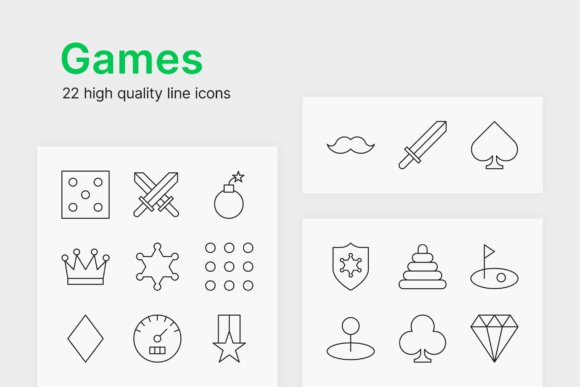
In the rapidly evolving landscape of digital design, user interface elements serve as the silent language between an application and its user. Among these elements, Game Icons occupy a unique space where functionality meets entertainment. Whether you are developing a mobile RPG, designing a streaming overlay, or creating marketing materials for an esports tournament, the visual consistency of your iconography dictates the professional polish of the final product. This comprehensive guide explores the practical utility of a specialized set of 22 game icons, focusing on their vector nature, customization potential, and technical requirements for optimal implementation.
The Strategic Value of Vector-Based Game Assets
When sourcing graphical assets, creators often face a choice between rasterized images and scalable vectors. For Game Icons, the distinction is critical. Raster formats like PNG or JPG are pixel-dependent; enlarging them results in blurriness and artifacting that can ruin a sleek interface. In contrast, this collection is delivered as separate SVG (Scalable Vector Graphics) files. This format relies on mathematical paths rather than fixed pixels, ensuring that every curve and line remains crisp regardless of the display size.
The primary advantage here is future-proofing. A gaming dashboard designed today might need to be adapted for a 4K monitor tomorrow or scaled down for a smartwatch notification. With vector-based Game Icons, you eliminate the need to redraw or repurchase assets for different resolutions. The set of 22 icons covers essential gaming terminology and symbols, providing a foundational vocabulary that communicates instantly with players without requiring textual labels.
Customization: Controlling Thickness, Color, and Scale
One of the most significant benefits of working with this specific set of Game Icons is the granular control it offers designers. Unlike pre-rendered images where style decisions are permanent, SVG files allow for real-time adjustments that align with specific brand guidelines.
- Line Weight Adjustment: Visual hierarchy often depends on stroke thickness. You can increase line weight for high-contrast accessibility or thin it out for a minimalist, modern aesthetic. This flexibility ensures the icons match the typography and overall UI density of your project.
- Color Adaptation: Gaming interfaces vary wildly from neon cyberpunk palettes to muted earth tones. Because these are vectors, changing colors is instantaneous. You can apply global swatches in your design software to rebrand the entire set of 22 game icons in seconds, ensuring perfect harmony with your application’s theme.
- Lossless Scaling: As mentioned, scaling does not degrade quality. However, it also allows for creative composition. You might use a large version of a controller icon as a background watermark while using the same asset at 16px for a toolbar button, maintaining identical geometric integrity across both instances.
Software Compatibility and Workflow Integration
While SVG is a web-standard format, editing these files requires appropriate tools. It is vital to understand the distinction between viewing, basic editing, and full manipulation when working with Game Icons.
The Role of Professional Vector Editors
To fully leverage the editability of this product, we strongly recommend using dedicated vector editing software such as Adobe Illustrator or CorelDRAW. These programs are engineered to interpret and manipulate the underlying XML code of SVG files. They allow you to ungroup elements, adjust anchor points, modify stroke profiles, and export in various optimized formats. If you intend to alter the shape of the icons or combine them into new composite graphics, these industry-standard tools are non-negotiable.
Limitations of Raster Software
A common point of confusion arises regarding Adobe Photoshop. While Photoshop can indeed open SVG files, it typically rasterizes them upon import or treats them as smart objects with limited internal editability. You may be able to scale the smart object or apply layer effects, but you cannot easily change the stroke width or recolor individual paths within the Photoshop environment. For users whose workflow is strictly photo-based, this limitation can be frustrating. Understanding this constraint upfront saves time and ensures you select the right tool for modifying your set of 22 game icons.
Practical Applications Across Industries
The versatility of Game Icons extends far beyond video game development. The semantic clarity of these symbols makes them valuable assets in various professional and consumer contexts.
- User Interface Design: Mobile apps and desktop launchers rely on recognizable metaphors. A shield icon universally signifies defense or security settings, while a trophy represents achievements. Using a cohesive set ensures that navigation feels intuitive rather than disjointed.
- Content Creation and Streaming: Streamers and YouTubers frequently need custom overlays. Having a personal library of editable Game Icons allows creators to build unique alert boxes, donation goals, and stream menus that stand out from generic template packs.
- Print Merchandise: Because SVGs are resolution-independent, they are ideal for print production. T-shirts, stickers, and posters require high-DPI artwork. This set can be scaled to billboard size for an esports venue banner without any loss of fidelity, making it a cost-effective asset for physical marketing.
- Educational Materials: Gamification in education uses gaming aesthetics to engage students. Teachers and e-learning developers can utilize these icons to create progress bars, level-up indicators, and reward systems within learning management platforms.
Evaluating Suitability for Your Project
Before integrating any asset pack, professionals must assess whether it meets their specific technical and aesthetic needs. When considering this set of 22 game icons, evaluate the following factors:
Stylistic Consistency
Does the line art style match your existing design system? If your project uses filled, solid glyphs, a line-art icon set may require significant modification to fit. Conversely, if your brand identity is built on outline aesthetics, this vector set provides a ready-made solution. Remember that because these are vectors, minor stylistic tweaks are possible, but major overhauls may negate the time-saving benefit of purchasing a pre-made set.
Scope of Coverage
Twenty-two icons provide a robust starter kit, but complex projects may require more. Audit your wireframes or design briefs to ensure all necessary states and actions are covered. If you need niche symbols not included in this set, consider whether the style is simple enough that you could create matching additions yourself using the same vector software. The true value lies in the set serving as a foundation that accelerates your workflow rather than a restrictive boundary.
Technical Proficiency
Be honest about your team's capabilities. If no one has access to or experience with Adobe Illustrator or CorelDRAW, the full potential of these Game Icons will remain locked. In such cases, you might need to budget for training or hire a freelancer to perform necessary customizations. Alternatively, if you only need static usage at fixed sizes, confirm that the provided SVGs render correctly in your target browsers or applications without requiring deep editing.
Best Practices for Implementation
To maximize the longevity and performance of your vector assets, adhere to established best practices. Always keep a master copy of the original SVG files in a secure archive. Work on duplicates when making modifications to preserve the source integrity. When exporting for web use, utilize optimization tools to strip unnecessary metadata and reduce file size, ensuring fast load times without compromising visual quality.
Furthermore, maintain a consistent naming convention for your exported assets. A well-organized library of Game Icons streamlines collaboration between designers and developers. Clear documentation regarding which icon corresponds to which function prevents implementation errors during the development phase.
Ultimately, this set of 22 game icons represents more than just a collection of pictures; it is a flexible design system component. By understanding the technical advantages of the SVG format, respecting software requirements, and applying strategic customization, creators can elevate their projects with professional-grade visuals that communicate effectively across any medium. Whether for a blockbuster game title or a local community event, the right iconography bridges the gap between concept and user experience, proving that even the smallest visual elements carry significant weight in digital communication.