New Game Controller Skin Mockup Part 2: Integrating High-Fidelity 3D Assets into Design Workflows
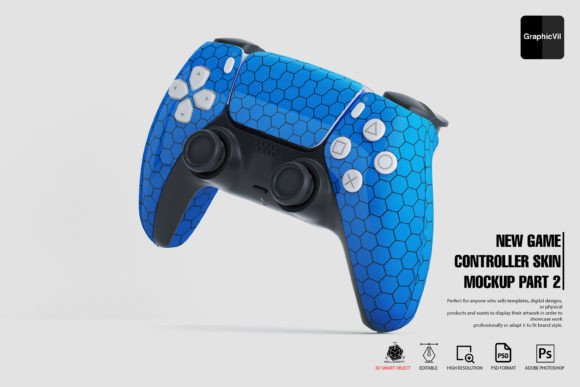
In the competitive landscape of product design and digital marketing, the presentation of a concept is often as critical as the concept itself. For designers, marketers, and entrepreneurs working in the gaming hardware space, visualizing custom skins or UI overlays requires more than simple flat graphics. The New Game Controller Skin Mockup Part 2 serves as a specialized bridge between initial design ideation and final client approval. This asset is not merely a static image but a comprehensive, layered PSD toolkit designed to integrate seamlessly into professional creative workflows. By leveraging high-resolution 3D smart objects, this mockup allows users to validate aesthetic decisions, present portfolio pieces with authority, and streamline the revision process without requiring dedicated 3D rendering software for every iteration.
Strategic Application Across Project Phases
Understanding where this resource fits within a broader project timeline maximizes its return on investment. While many associate mockups solely with final deliverables, the utility of New Game Controller Skin Mockup Part 2 extends across pre-production, active design, and post-launch marketing.
Pre-Production and Concept Validation
During the early stages of a skin design or hardware branding project, stakeholders often struggle to visualize how 2D patterns wrap around complex ergonomic curves. Using this mockup during the conceptual phase allows teams to identify potential distortion issues or color mismatches before committing to manufacturing or final coding. It acts as a rapid prototyping tool where multiple variations can be tested against realistic lighting conditions. This reduces the feedback loop significantly, allowing art directors to approve directions based on near-final visuals rather than abstract sketches.
Client Presentations and Portfolio Development
For freelancers and agencies, the perceived value of a service is tied directly to presentation quality. This mockup provides 100 high-resolution Photoshop files featuring different angles, ensuring that no matter the context—whether a vertical social media post, a horizontal website banner, or a printed lookbook—there is an appropriate perspective available. The ability to customize reflections and specular lighting means the asset can be adapted to match the mood of a specific campaign, from moody, low-key cyberpunk aesthetics to clean, studio-lit commercial product shots. For UI/UX case studies, showcasing controller skins in situ helps demonstrate an understanding of physical-digital interaction, adding depth to portfolio entries.
Technical Prerequisites and Environment Setup
Efficiency in any digital workflow depends entirely on technical compatibility. Before integrating New Game Controller Skin Mockup Part 2 into your pipeline, it is imperative to address specific software requirements. This product relies on 3D smart object technology, which has specific version dependencies within the Adobe ecosystem.
Critical Version Compatibility: Users must utilize a minimum of Adobe Photoshop CC2016 or select versions of CC2015. However, due to architectural changes in newer releases, the latest versions of Photoshop may exhibit instability when handling legacy 3D features. Adobe officially recommends using Photoshop version 22.2 (released February 2021) for the most stable performance with 3D smart objects. Before purchase or deployment, verify that your specific installation includes the "3D" menu. If this menu is absent, the core functionality of this mockup will be inaccessible.
Resolving Display and Canvas Issues
A common friction point for Mac and Windows users involves viewport rendering errors. If you encounter issues such as an inability to see the entire PSD, failure to modify the 3D start object, or a blank canvas despite visible layers in the Layer Panel, this is typically a configuration setting rather than a file corruption issue. To resolve this, navigate to Preferences > Technology Previews and check the box labeled "Deactivate Native Canvas." A restart of Photoshop is required after changing this setting. Performing this setup step immediately upon installation prevents downtime during critical production windows.
Customization Capabilities and Visual Control
The primary advantage of using a layered PSD over a static template is granular control. New Game Controller Skin Mockup Part 2 is engineered for deep customization, allowing designers to maintain brand consistency while adapting to various environmental contexts. The included Help folder guides users through these adjustments, but understanding the practical application of these controls enhances workflow speed.
- Smart Object Integration: The core skin application occurs within smart objects. This non-destructive workflow ensures that you can swap textures, adjust vector logos, or tweak color grading at any stage without degrading image quality. Changes propagate automatically across the 3D mesh.
- Advanced Lighting Control: Realism is defined by light interaction. This mockup separates main light effects from specular highlights, allowing independent adjustment. You can simulate different studio setups or environmental lighting scenarios to match other assets in a composite layout.
- Reflection Management: Surfaces react differently to their environment. With up to three distinct reflection controls, users can dial in the exact amount of glossiness or matte finish required. This is particularly useful when distinguishing between plastic grips, metallic accents, and rubberized touch surfaces on the controller.
Workflow Integration and Best Practices
To derive maximum efficiency from this asset, treat it as a modular component of your design system rather than a standalone novelty. Organization and preparation are key to maintaining momentum when working with 100 separate high-resolution files.
File Organization and Asset Management
Given the volume of angles and resolutions provided, establishing a clear naming convention and folder structure is essential. Create a master directory for the mockup source files and separate output folders for each project variant. When working on multiple skin concepts simultaneously, use color coding in the Photoshop layer panel to distinguish between base geometry, lighting adjustments, and texture overlays. This organizational discipline reduces cognitive load and accelerates file retrieval during collaborative reviews.
Quality Control and Consistency
When producing a series of images for a campaign or portfolio, visual consistency builds trust. Utilize the same lighting preset and camera angle settings across related renders to create a cohesive narrative. Because the mockup supports 24/7 support and includes detailed documentation, leverage these resources to standardize your team’s approach. If multiple designers are using the asset, create a shared "master preset" file that contains your preferred lighting and reflection settings. New projects can then inherit these settings, ensuring that every render meets the same quality benchmark regardless of who executes the task.
Optimizing for Different Output Channels
Different platforms demand different specifications. While the source files are high resolution, always plan your export strategy based on the end destination. For web-based UI/UX case studies, optimize exports for fast loading without sacrificing the clarity of the skin texture. For print materials or large-format displays, utilize the full resolution capabilities of the PSD. The variety of angles included in Part 2 allows for strategic cropping; a tight close-up might better showcase texture detail for a manufacturing spec sheet, while a wider 3/4 view communicates overall form factor for consumer advertising. Aligning the chosen angle with the communication goal ensures the mockup serves a functional purpose beyond mere decoration.
Long-Term Value and Scalability
Investing in premium mockup assets like New Game Controller Skin Mockup Part 2 is a decision rooted in long-term operational efficiency. Unlike free alternatives that often lack layer organization or lighting flexibility, this completely customizable toolkit is built for repeated use. As design trends shift or new controller models enter the market, the fundamental skills and workflows developed using this asset remain transferable. Furthermore, the inclusion of ongoing support ensures that technical hurdles do not become permanent blockers.
For educators and content creators, this asset also serves as a teaching tool for demonstrating material properties, lighting theory, and professional presentation standards. By incorporating such high-fidelity resources into daily routines, professionals elevate their output quality while reducing the time spent on technical troubleshooting. Ultimately, the goal is to make the visualization process invisible, allowing the focus to remain squarely on the creativity and strategy driving the project forward. Whether validating a new product line or refining a personal portfolio, the integration of robust, editable 3D mockups remains a cornerstone of efficient modern design practice.