Game Ui Star: High-Quality Assets for Creators
Finding the right visual assets can often be the biggest bottleneck in game development and digital design. Whether you are an indie developer working on your first mobile RPG or a marketing professional designing a gamified landing page, the interface is usually the last thing to get polished and the first thing to frustrate users if done poorly. Game Ui Star addresses this specific pain point by providing a comprehensive library of interface elements designed specifically for interactive media. Rather than spending dozens of hours drawing buttons, health bars, and inventory slots from scratch, creators can access professionally crafted assets that maintain stylistic consistency across an entire project.
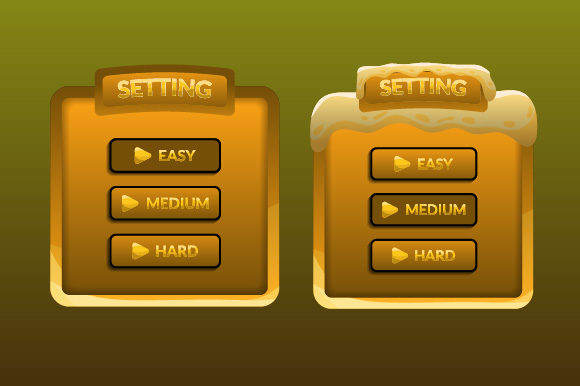
The core appeal of this collection lies in its versatility and technical readiness. It is not merely a folder of random images; it is a curated system of UI components that work together visually. For beginners, this eliminates the steep learning curve associated with graphic design software. For professionals, it drastically reduces production time, allowing teams to focus on gameplay mechanics and user experience testing rather than pixel-pushing. The assets bridge the gap between amateur prototypes and commercial-grade products, offering a level of polish that typically requires a dedicated UI artist.
Understanding the Technical Deliverables
One of the most critical aspects of acquiring digital assets is understanding exactly what you receive and how it integrates into your workflow. With Game Ui Star, the delivery format is optimized for immediate use without compromising future flexibility. Each illustration is separated in a zip file as a high resolution PNG file on a white background. This organization might seem minor, but it significantly streamlines the import process. Instead of digging through a single massive sprite sheet or untangling layered PSD files, you can locate and drag individual assets directly into your game engine or design tool.
The inclusion of both raster and vector formats ensures longevity for your project. You will receive Images PNG for quick implementation and Vector EPS files for unlimited scalability. While the PNGs are perfect for standard screen resolutions and rapid prototyping, the EPS vectors allow you to resize elements for 4K displays, print materials, or large-format promotional banners without any loss of quality. This dual-format approach protects your investment, ensuring the assets remain useful even as display technologies evolve or your project expands beyond its original scope.
Resolution and Commercial Safety
Preview images on asset marketplaces are often compressed or watermarked to protect intellectual property, which can make it difficult to judge true quality. A major advantage here is that no watermark will appear on your downloaded illustrations. What you see in the preview is a representation, but the illustration you will receive will be rendered in a much higher quality than what you will see in the preview image. This distinction is vital for commercial projects where crisp, clean edges and vibrant colors define the perceived value of the product. Blurry or artifact-heavy UI elements can make even the best gameplay feel cheap, so having access to source-quality resolution is non-negotiable for serious developers.
Practical Applications Across Different Fields
While the name suggests a focus on gaming, the utility of these assets extends far beyond traditional video games. The clean, recognizable iconography and interface patterns are universally applicable in digital communication. Understanding where and how to apply these resources can unlock value for a wide variety of users.
- Indie Game Development: Solo developers often wear every hat. Using pre-made UI kits allows you to achieve a cohesive art style without hiring a specialist. The consistent color palettes and stroke weights ensure that your main menu, HUD, and pause screens look like they belong to the same universe.
- Educational Software: Gamification is a powerful tool in education. Teachers and ed-tech creators can use these assets to build engaging quiz interfaces, progress trackers, and reward systems for students. The familiar visual language of gaming helps lower anxiety and increase engagement in learning environments.
- Marketing and Web Design: Brands looking to appeal to younger demographics or tech-savvy audiences often incorporate gaming aesthetics into their web presence. These vectors are ideal for creating interactive infographics, loyalty program dashboards, or event landing pages that stand out from standard corporate designs.
- Content Creation and Streaming: Streamers and YouTubers frequently need custom overlays, alert boxes, and menu graphics. Because the assets are provided as high-resolution PNGs with transparent backgrounds (derived from the white background masters), they can be easily composited over video feeds or thumbnails without complex masking.
Key Considerations Before Implementation
Before integrating Game Ui Star into your next project, there are several practical factors to evaluate to ensure it aligns with your specific needs. While the assets are high-quality and versatile, successful implementation requires thoughtful planning.
First, consider the art direction of your existing project. UI should never exist in a vacuum; it must support the overall aesthetic. If your game features hyper-realistic 3D graphics, a stylized cartoon UI kit might create cognitive dissonance for the player. Review the vector EPS files to determine if the line weight and color saturation can be adjusted to better match your environment. Because they are vectors, you have the freedom to tweak hues and thicknesses, but starting with a kit that is tonally similar to your vision will save significant editing time.
Secondly, think about accessibility and readability. High-resolution assets are excellent, but they must be legible at various sizes. When using the PNG exports, test them at the actual display resolution of your target platform. A button that looks beautiful at 1080p might become too small to tap comfortably on a mobile device or too pixelated on a retina display. Utilizing the vector source files allows you to generate resolution-specific exports, ensuring that text remains sharp and touch targets remain appropriately sized for all users.
Finally, understand the licensing and usage rights associated with the download. While the absence of watermarks facilitates commercial use, always verify the specific license terms regarding redistribution or modification. For most entrepreneurs and freelancers, the standard license covers client work and personal projects, but if you plan to resell the assets as part of another template pack or NFT collection, additional permissions may be required. Clarifying this upfront prevents legal headaches down the road and ensures your creative business remains compliant.
Maximizing Value Through Workflow Integration
To truly get the most out of this asset pack, integrate it into a sustainable workflow rather than treating it as a one-time fix. Organize the downloaded zip files logically within your project repository. Since each illustration is separated, maintaining a clear naming convention in your own file structure will prevent confusion as your project grows. Pairing the PNG assets with a design system document can help team members understand which buttons correspond to which states (hover, active, disabled), maintaining consistency even when multiple people are working on the interface.
Furthermore, leverage the vector EPS files for future-proofing. Even if you only need 1080p assets today, keeping the master vectors archived means you can return to the project years later and upscale everything for new hardware without redrawing a single pixel. This forward-thinking approach transforms a simple asset purchase into a long-term design infrastructure. By combining the immediate convenience of high-res PNGs with the enduring flexibility of vectors, Game Ui Star serves as both a quick solution for current deadlines and a foundational resource for future iterations.