Vector Stock for UI Game: Selecting Assets That Actually Work
When developing a video game, the user interface is often the last element to receive attention, yet it is the first thing a player interacts with. Finding high-quality vector stock for UI game design can significantly accelerate production, but the process is fraught with subtle pitfalls that can compromise your final product. Many developers and designers assume that any scalable graphic will suffice, only to discover later that the assets lack the necessary technical structure or visual cohesion required for a professional interface. Understanding what makes specific vector illustration for game UI functional, rather than just decorative, is the difference between a polished experience and a frustrating one.
Vector stock for UI game projects refers to pre-made, resolution-independent graphical assets designed specifically for interactive menus, heads-up displays (HUDs), settings panels, and inventory systems. Unlike raster images, these assets are defined by mathematical paths, allowing them to scale infinitely without pixelation. This is essential for modern development where games must support varying screen resolutions from mobile devices to 4K monitors. However, the interest in these assets often stems from a desire to save time, which can inadvertently lead to choosing quantity over quality. The true value lies not just in scalability, but in finding assets that are structurally prepared for dynamic interaction and consistent theming.
The Trap of Visual Inconsistency
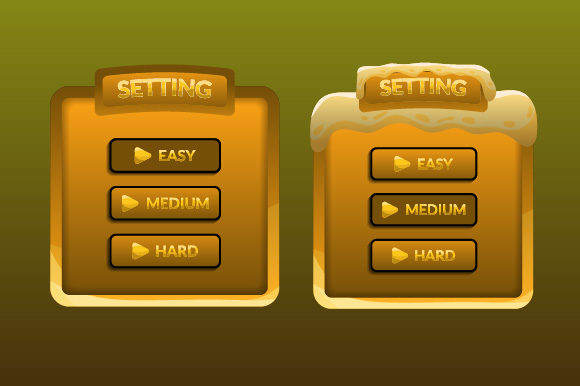
One of the most frequent mistakes when sourcing vector design illustration for game UI is mixing assets from different creators without a unification strategy. It is tempting to download a sleek sci-fi button pack from one source and a minimalist progress bar from another because they individually look appealing. When placed together in a simple easy concept menu settings panel, however, the discrepancies in line weight, corner radius, shadow depth, and color palette become glaringly obvious. This visual dissonance breaks immersion and signals to the player that the interface was assembled hastily rather than designed intentionally.
To avoid this, evaluate stock based on systemic compatibility rather than individual beauty. Before downloading or purchasing, open the preview files and compare the stroke widths and geometric construction. If you are building a flat design interface, ensure all selected assets adhere to the same pixel grid and optical alignment rules. A better approach is to source comprehensive UI kits from a single designer or studio, as these are created with internal consistency. If you must mix sources, budget time for customization. Treat downloaded vectors as raw materials that require adjustment to match your project’s specific art direction, not as finished components ready for immediate implementation.
Overlooking Technical Editability
Scalability does not automatically equal editability. A common frustration arises when designers download vector stock for UI game elements only to find that the layers are flattened, grouped illogically, or constructed with expanded strokes that cannot be easily modified. For example, if you need to change the color of a settings icon to indicate an active state, but the icon has been rasterized within the vector file or merged into a complex compound path, you will spend more time redrawing it than you would have creating it from scratch. This negates the efficiency benefits of using stock assets entirely.
Always verify the layer structure before committing to an asset pack. Look for files that utilize non-destructive editing techniques, such as shape layers, smart objects, or symbol instances. In Adobe Illustrator or Figma, check that colors are managed through global swatches or variables rather than hard-coded fills. This allows you to update the entire color scheme of a menu system in seconds. Additionally, ensure that text elements remain editable or are accompanied by the original font files. Assets that rely on outlined text are useless for localization or dynamic content updates, severely limiting their utility in a real-world game development pipeline.
Neglecting Interactive States and Feedback
Game interfaces are interactive by definition, yet many vector stock packages provide only static representations of UI elements. A beautiful vector illustration for game UI might show a pristine "Options" button, but fail to include hover, pressed, disabled, or focused states. Implementing a menu system with only default states results in a lifeless interface that provides no feedback to player input. Attempting to artificially create these states by simply darkening or blurring the base asset often looks unprofessional and inconsistent with the original design intent.
Prioritize stock that includes complete state variations for every interactive element. If a pack only offers default states, assess whether the construction method allows you to generate variations procedurally or through style overrides. For a simple easy concept menu settings screen, this means having clear visual distinctions for toggles that are on versus off, sliders at different positions, and tabs that are active versus inactive. If the stock lacks these essentials, factor the additional design time into your schedule. Sometimes, it is more efficient to use a simpler, less ornate asset pack that includes full interaction states than a visually stunning but incomplete set that requires extensive manual expansion.
Misunderstanding Licensing for Commercial Games
Licensing is frequently overlooked until a legal issue arises. Many creators assume that purchasing vector stock for UI game assets grants unlimited rights, but licenses vary significantly regarding commercial distribution, modification, and attribution. Some standard licenses prohibit use in products where the primary value is the asset itself, while others restrict the number of end-users or require separate licensing for each platform release. Using an asset with restrictive licensing in a commercial title can lead to takedown notices, revenue loss, or legal penalties.
Read the license agreement thoroughly before integration. Specifically, look for clauses addressing "end products," "redistribution," and "modification." Ensure the license covers your intended distribution model, whether that is premium sales, free-to-play with microtransactions, or subscription services. Keep records of your purchases and license certificates organized within your project documentation. If you are working with a team or plan to open-source your project later, verify that the license permits sub-licensing or transfer. When in doubt, contact the asset creator directly for clarification; most reputable marketplaces facilitate this communication. Investing a few minutes in verification prevents catastrophic issues during launch.
Evaluating Quality Beyond the Thumbnail
Marketplace thumbnails are designed to sell, not to inform. They often showcase assets at optimal zoom levels with perfect lighting and composition that may not reflect actual usability. Relying solely on preview images leads to disappointment when the actual files contain anchor point messes, inconsistent spacing, or hidden artifacts. High-quality vector design illustration for game UI should maintain integrity at both extreme close-ups and small sizes typical of HUD elements.
Develop a rigorous evaluation checklist before acquisition. Download sample files whenever possible to test in your actual development environment. Check how the vectors render in your game engine; some engines handle SVG imports differently, and complex gradients or meshes may not translate correctly. Verify that the assets align to standard pixel grids to prevent anti-aliasing blur on straight edges. Assess the negative space and padding to ensure text labels will fit comfortably within buttons and panels. By treating stock selection as a technical procurement process rather than a shopping spree, you ensure that every asset contributes positively to your game's usability and performance.